
Different settings can be used to calculate the extinguisher coverage. They can be changed in the 'settings' menu. To open settings, open Saval Brandveiligheid Assistent™, click on 'extinguisher coverage' and then on the 'settings' button.
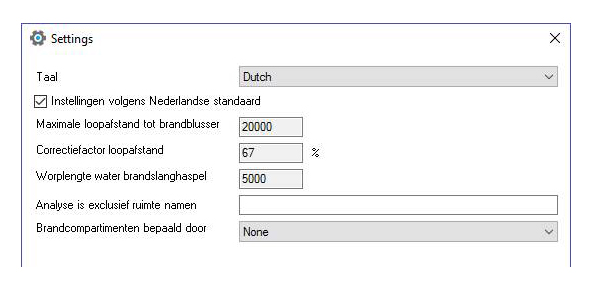
the settings
Language
In order to set the language of Saval Brandveiligheid Assistent™, click on the menu beside the 'language' heading. In the menu, you will see the following three options:
- Select 'English' to display the plug-in in English, independently of Revit ®.
- Select 'Dutch' to display it in Dutch, independently of Revit ®.
- Select 'Same as Revit' to display it in the same language as Revit®.
Settings according to Dutch standard
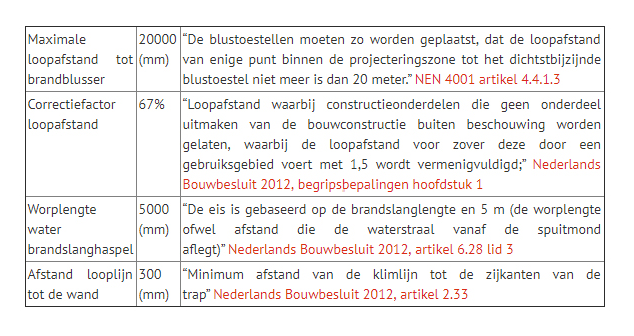
In order to set the values in accordance with the Dutch standard, check the heading 'settings according to Dutch standard'. The app then automatically uses the values which apply in the Netherlands, as shown below.
If the box ‘settings in accordance with Dutch standard’ is checked, the plug-in automatically completes them with the above values and they can no longer be adjusted manually. In order to adjust them manually, the box 'settings according to Dutch standard' should be unchecked.
Maximum walking distance to fire extinguisher
According to the Dutch standard, the maximum walking distance to a fire extinguisher is 20 metres (NEN4001). If the box ‘settings in accordance with Dutch standard’ is checked, the plug-in will automatically enter the value as 20000 (mm) and it can no longer be adjusted manually. In order to adjust it manually, the box ‘settings according to Dutch standard’ should be unchecked.
Correction factor for walking distance
For the purposes of the 2012 Buildings Decree, there is a correction factor for the walking distance, known as the ‘adjusted walking distance’. The maximum adjusted walking distance between a hose reel as referred to in paragraphs 1 and 2 and any point of the floor of a user function is the length of the hose plus 5 metres (the projection distance of water from the hose) – Netherlands Buildings Decree 2012, definition of terms chapter 1. This means 2/3 of the length, or 67%. If the box ‘settings in accordance with Dutch standard’ is checked, the plug-in automatically enters the value as 67%, and it can no longer be adjusted manually. In order to adjust it manually, the box ‘settings according to Dutch standard’ should be unchecked.
Projection distance of water from fire hosel
The distance of the water jet from the nozzle is five metres according to the Dutch standard. If the box ‘settings in accordance with Dutch standard’ is checked, the plug-in automatically enters the value as 5000 (mm), and it can no longer be adjusted manually. In order to adjust it manually, the box ‘settings according to Dutch standard’ should be unchecked. Netherlands Buildings Decree 2012, article 6.28, paragraph 3.
Distance from walking line to the wall
The plug-in uses the ‘distance from the walking line to the wall’ to calculate the walking distance around corners. This is particularly applicable for stairwells and doors. If the box ‘settings in accordance with Dutch standard’ is checked, the plug-in automatically enters the value as 300 (mm), and it can no longer be adjusted manually. In order to adjust it manually, the box ‘settings according to Dutch standard’ should be unchecked. Netherlands Buildings Decree 2012, article 2.33.
Analysis exclusive of room names
In order to exclude particular rooms from the calculation, an exception can be made under the heading 'analysis exclusive of room names'. In the blank field, a 'room occupancy' can be excluded by typing it into the field. Excluding multiple occupancies is possible by adding a comma between occupancies: {occupancy}, {occupancy}. By excluding particular rooms, these rooms are not included in the extinguishing coverage percentage.
Fire compartment determined by an extinguisher or fire hose
In order to determine the boundaries of the fire compartment, different settings may be used under the heading 'fire compartment determined by'.
- None; if the option 'none' is selected, no fire compartments are included in the calculation. Click this option if your project has no fire compartments.
- Wall type parameter 'Fire Rating'; explanation see below.
- Wall type name
- Area
- Wall Instance Parameter
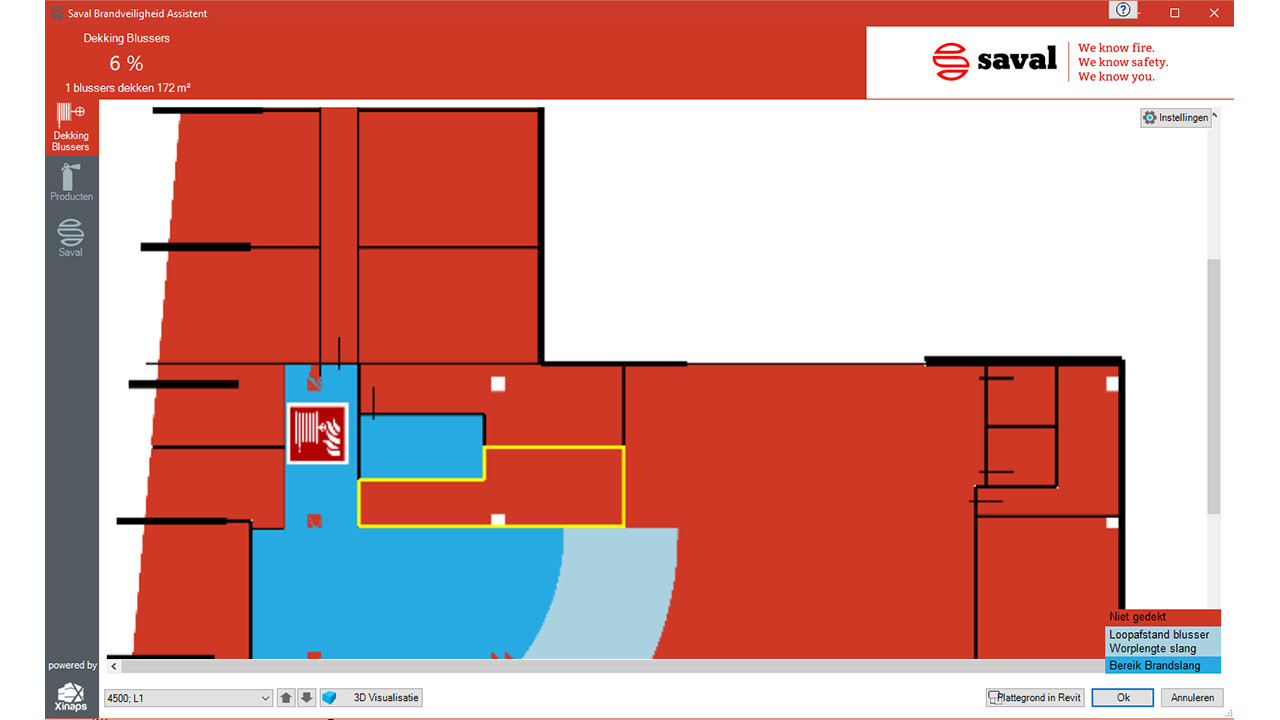
Fire compartments are indicated in the floor plan view in the Saval Brandveiligheid Assistent™ plug-in by a yellow line.
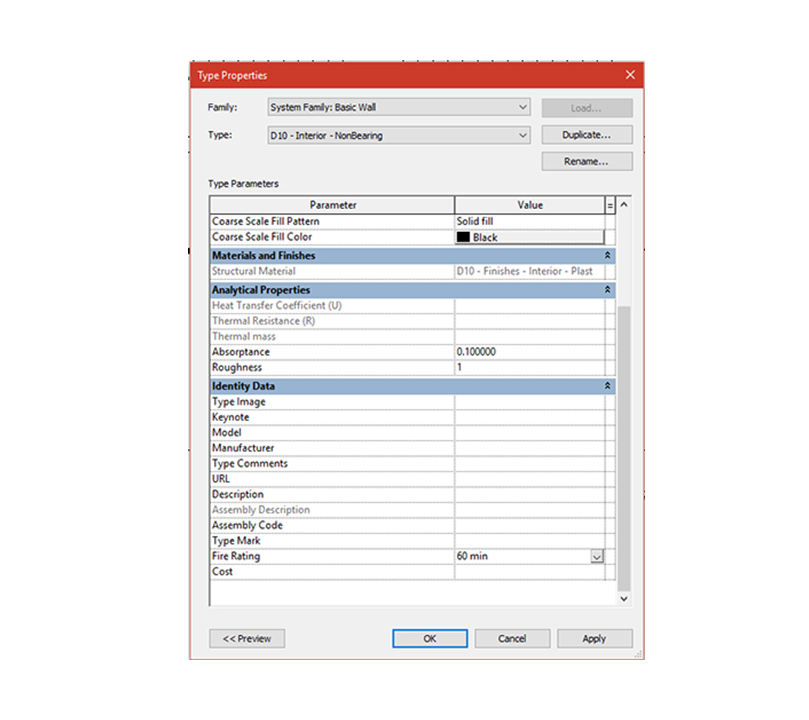
“Wall type parameter “Fire Rating”
If you select a 'wall' and then click on 'Edit type', the window below appears in which you can adjust the fire rating to, for example, 30, 60 or 90 min. Please note that if you amend a 'wall type', all the elements will be amended. It is therefore advisable to make various new elements.
If the fire rating has been set, it is possible to treat this as a fire compartment in the plug-in by selecting the function ‘Wall type parameter “Fire Rating”’ and then entering the ‘Fire Rating’ in the field for the search value, namely: 60 minimum. All 'Wall types' with this criterion will now be treated as fire compartments and will be indicated with a yellow line. They will not be included in the calculation of the fire-fighting equipment coverage percentage.
“Wall Type name”
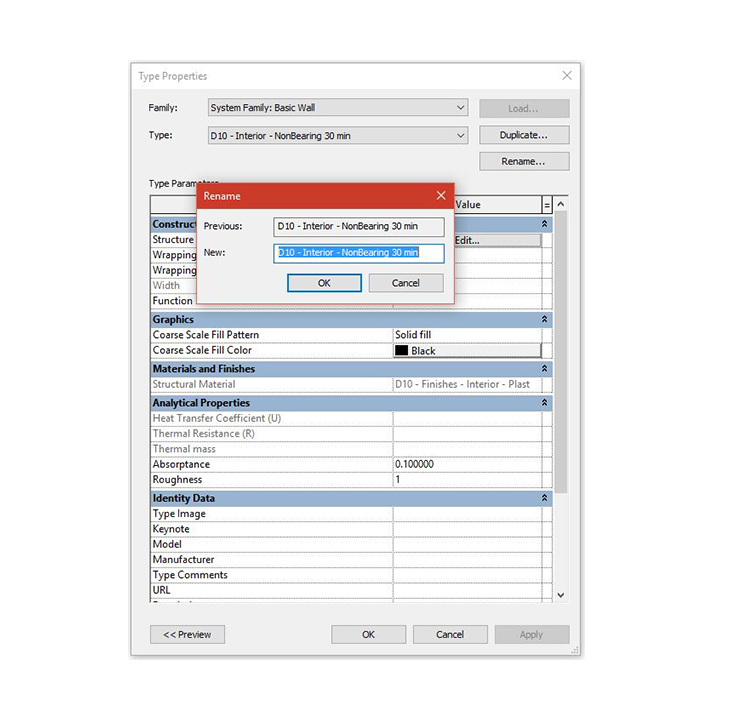
It is possible to define a fire compartment with a name. If you select a 'wall' and then click on 'Edit type', the following window appears in which you can change the name of the type by clicking on 'rename'. If you then change the name to '30 min', for example, you can treat all 'walls' with this value as fire compartments by selecting the 'Wall type name' function and then entering '30 min' for the search value. All ‘Wall' types with this criterion will now be treated as fire compartments and indicated with a yellow line. They will not be included in the calculation of the fire-fighting equipment coverage percentage. Instead of '30 min', you can enter any name you wish.
“Area”
In order to define a fire compartment based on an area, select the option 'Area'. When you do so, a menu appears in which the following options are displayed:
- Gross building
- Rentable
The selected option should match your selected setting for your area plan.
“Wall instance parameter”
It is possible to define a fire compartment by means of a 'wall instance parameter'. When this option is selected, a new menu appears with the following options:
- Mark
- Comments
- Type name
- Family name
“Mark”
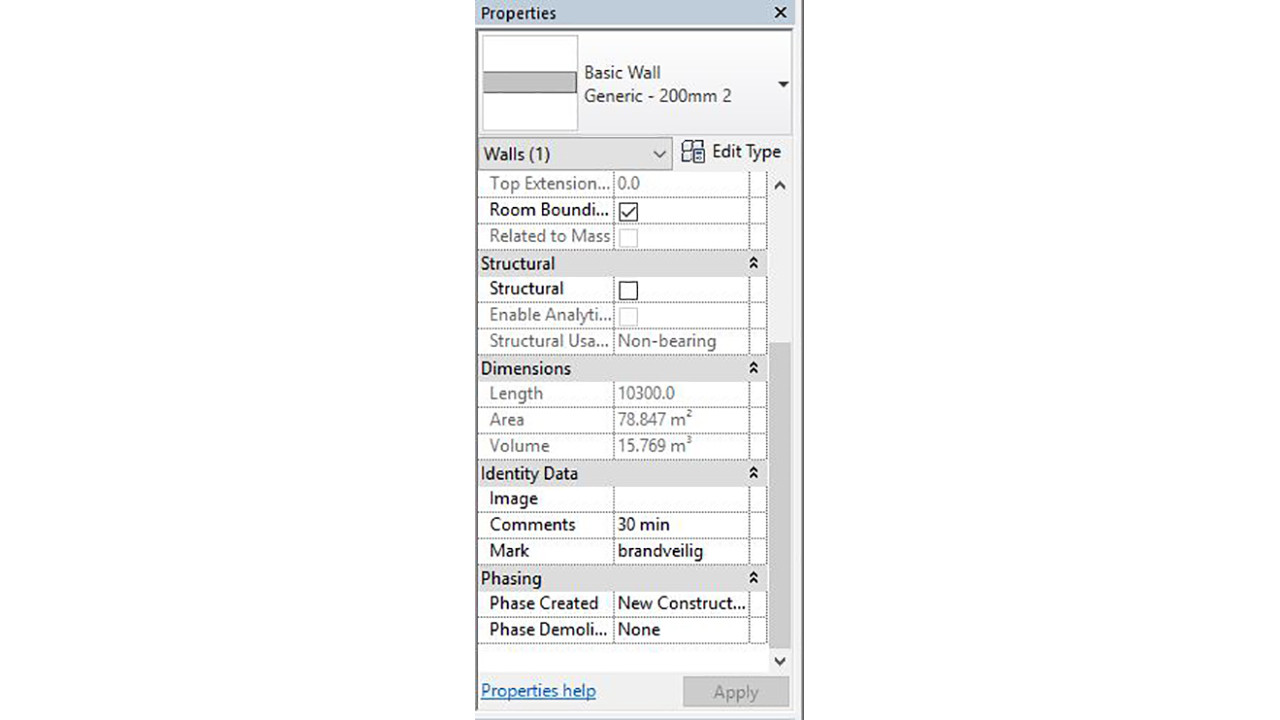
When you select a 'wall', you can add a 'Mark' under the heading 'Identity data'. Here you can enter any desired value such as: '30 min', 'fire safe', 'fire wall' etc. Once you have selected the option 'Wall instance parameter' in Brandveiligheid Assistent, followed by the option 'Mark', you can enter these values as the search values and it will be treated as a fire compartment.
“Comments”
When you select a 'wall', you can add 'Comments' under the heading 'Identity data'. Here you can enter any desired value such as: '30 min', 'fire safe', 'fire wall' etc. Once you have selected the option 'Wall instance parameter' in Saval Brandveiligheid Assistent™, followed by the option 'Comments', you can enter these values as the search values and it will be treated as a fire compartment.
DOWNLOAD THE PLUG-IN OR OUR REVIT® FAMILIES
Support
Support